
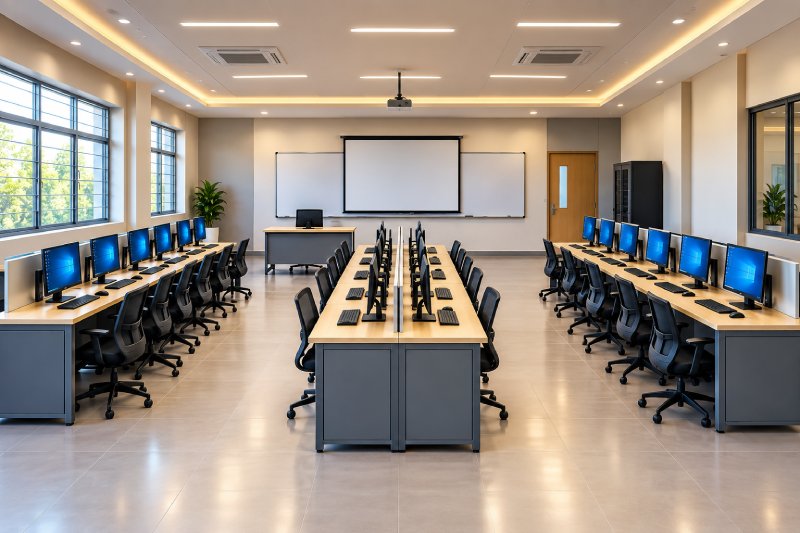
A well-designed computer lab is more than a room filled with computers. The computer lab furniture needs to support comfortable student work, efficient movement, easy supervision and organized cable routing. Whether you are setting up an ICT lab in a school or upgrading a college computer laboratory, the furniture layout should be planned alongside the technology.
A thoughtful computer lab layout can make better use of available floor space while keeping workstations practical and easy to maintain.
Start with the Room and Student Capacity
Before selecting a computer lab table, measure the room and determine how many students need to use it at one time. The number of computers, monitor sizes, networking equipment and instructor requirements should also be considered.
Avoid fitting the maximum possible number of workstations if it leaves little room for movement or maintenance. A slightly more open arrangement can make supervision easier and provide better access to equipment.
Vardhaman Trading provides customized computer lab layouts based on room dimensions, number of users and equipment requirements. Its listed individual workstations are approximately 900–1500 mm long per user, 450–750 mm wide and 720–750 mm high, while multi-user workstations can be configured according to the number of users.
Choosing the Right Computer Lab Table
A computer lab table should accommodate the monitor, keyboard, mouse and other essential equipment without leaving students with an unnecessarily cramped working area.
For schools, individual or compact multi-user workstations can be useful where the room needs to accommodate several students. Colleges and technical institutes may require larger workstations where students use additional peripherals, laptops, reference materials or specialized equipment.
The table construction is equally important. Institutional-grade surfaces, sturdy frames, durable hardware and easy-to-clean finishes are useful in labs that experience regular daily use.
Popular Computer Lab Layout Options
There is no single layout that works for every ICT lab. The arrangement should reflect the room shape, number of students and teaching method.
Row-Based Layout
Workstations are positioned in rows facing the front of the classroom. This is a straightforward option for conventional teaching because the instructor can address students from the front.
Perimeter Layout
Tables are positioned along the walls, leaving an open central area. This can make supervision and movement easier while providing a clear space in the middle of the room.
Cluster Layout
Several workstations are grouped together to encourage collaborative activities. This can work particularly well for project-based computer classes and group assignments.
U-Shaped Layout
Workstations follow the walls in a U-shaped arrangement, allowing the teacher to move through the centre. It can provide good visibility of students while maintaining a central circulation area.
The final arrangement should always be checked against actual room dimensions, doors, windows, electrical points and equipment requirements rather than relying solely on a standard floor plan.
Plan Cable Management from the Beginning
One of the most overlooked aspects of an ICT lab setup is cable management. Computers require power, networking and sometimes additional peripheral connections. Unplanned cables can quickly create visual clutter and make cleaning, troubleshooting and maintenance more difficult.
A better approach is to plan cable routing as part of the furniture design. Tables can incorporate cable-management channels, routing holes or provisions that keep wires organized beneath or behind the workstation.
Vardhaman Trading’s computer workstations can incorporate cable-management provisions, while CPU and equipment storage can also be integrated into the furniture configuration.
Don’t Forget the Instructor Workstation
The teacher’s position is an important part of the computer lab layout. An instructor workstation should provide enough space for demonstrations, teaching equipment and administrative tasks while allowing the teacher to maintain visibility across the room.
Vardhaman Trading lists instructor tables around 1200–1800 mm long and 600–750 mm wide, with customization available according to project requirements.
For teaching-focused labs, positioning the instructor where most screens and students are visible can make classroom monitoring more practical.
Spacing and Movement Matter
A computer lab should not feel overcrowded even when every workstation is occupied. Students and teachers need clear paths to enter, leave and move between workstations. Technicians also need access to computers, networking equipment and electrical connections for maintenance.
When planning furniture, consider:
- Student seating and workstation dimensions
- Main circulation paths
- Access to doors and emergency exits
- Electrical and networking points
- Teacher movement and visibility
- CPU and UPS placement
- Cleaning and maintenance access
- Space required for future equipment changes
The objective is to balance student capacity with usability, rather than simply maximizing the number of computers.
Materials and Durability for Daily Use
School and college computer labs experience repeated daily use, so furniture should be selected for institutional conditions. Vardhaman Trading offers computer laboratory furniture using options such as powder-coated mild-steel frameworks, pre-laminated particle board, engineered wood, plywood-based panels, high-pressure laminate finishes and edge-banded work surfaces.
The appropriate material combination depends on usage, budget, equipment requirements and the expected life of the installation.
Computer Lab Furniture Should Be Planned as a System
A successful laboratory combines workstations, seating, cable management, equipment storage and teaching areas into one coordinated setup. Selecting tables first and trying to fit the technology afterward can create unnecessary problems with wiring, movement and maintenance.
Vardhaman Trading provides computer workstations, student tables, instructor desks, CPU storage, computer chairs and supporting furniture, with customized layouts available for schools, colleges, universities, coaching institutes and training centres.
The company also offers free on-site demonstrations, customization, delivery and installation as part of its institutional furniture solutions.
Plan a Computer Lab That Works for Students and Teachers
The right computer lab furniture should make technology easier to use—not create another obstacle around it. Start with the room dimensions and student capacity, plan workstation sizes and circulation, integrate cable management and equipment storage, and leave enough flexibility for maintenance and future upgrades.
For schools and colleges planning a new ICT lab or renovating an existing computer room, a customized furniture layout can help create a cleaner, more organized and practical learning environment.
Planning a computer lab in Pune? Contact Vardhaman Trading to discuss your room size, student capacity and workstation requirements, or arrange a Free On-Site Demo.